Stop Finding Out About Failed Messages From Your Customers

Get instant Slack notifications when Azure Service Bus messages hit the dead letter queue with AI-powered context so you can fix issues before they escalate.

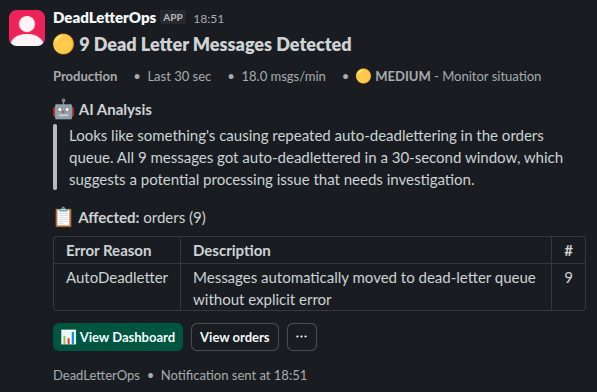
Slack notification showing DeadLetterOps alert with AI analysis

You're Checking Azure Portal Multiple Times a Day, Aren't You?

Manual queue checking becomes someone's daily routine. Dead letters sit unnoticed until customers complain. The data exists in your logs, but nobody's actively watching them.

The constant context switching between Azure Portal, logs, and Slack discussions slows everything down. And those late-night emergency investigations? They could have been prevented with proactive alerting.

The real cost of manual monitoring:

  • Reactive firefighting You find out about failures when customers complain
  • Manual queue checking Someone has to remember to log into Azure Portal
  • Context switching Jumping between monitoring tools, Azure Portal, and Slack
  • No context Alert says 'message failed' but doesn't say why

The impact on your business:

  • Lost revenue from failed transactions
  • Frustrated customers experiencing delays
  • Engineers pulled into emergency investigations
  • SLA breaches and compliance issues

Get Notified The Moment Messages Fail With Full Context

DeadLetterOps sends intelligent Slack notifications that tell you what failed, why it failed, and what to do next.

Instant Alerts

Event-driven monitoring detects dead letter messages the moment they arrive. No polling delays, no manual checking.

AI-Powered Summaries

Every alert includes what failed and likely why. Understand the failure without digging through logs.

One-Click Investigation

Click through from Slack directly to message details. Reprocess, analyse, or export without leaving your workflow.

Slack notification from DeadLetterOps showing dead letter message alert with AI-powered analysis

Every notification includes AI-generated context so you know exactly what failed and why

From Setup to First Alert in Under 5 Minutes

  1. Connect Your Azure Service Bus Add your connection string and we'll automatically discover all your queues and topics
  2. Install the Slack App Quick OAuth setup - just choose which channels you want to receive alerts in
  3. Configure Your Alert Rules Decide which queues to monitor and when you want to be notified
  4. Start Receiving Alerts Get intelligent notifications with AI analysis explaining each failure

Control Exactly What Notifications You Receive

Flexible configuration options:

  • Route different queues to different Slack channels
  • Set thresholds (notify after X failures in Y minutes)
  • Quiet hours for non-critical queues
  • Filter by message properties or content patterns
  • Batch notifications for high-volume scenarios

Why Not Just Use Azure Monitor or Custom Scripts?

You could spend weeks building and maintaining a custom notification system. Or you could set up DeadLetterOps in 5 minutes and get back to building features that matter to your business.

What you typically use today:

  • Azure Monitor Generic metric alerts with no message context. You get a graph showing failures spiked, but no details about what failed or why. Still requires manual Azure Portal investigation.
  • Service Bus Explorer Great desktop tool for browsing messages, but you have to remember to open it and manually check. No automatic notifications, no proactive alerting.
  • Custom Scripts You own the entire stack - monitoring logic, error handling, Slack formatting, failure detection, and maintenance. Every edge case is your responsibility.
  • Application Insights Great for application telemetry, but not purpose-built for Service Bus dead letters. Requires custom queries and alert rules. No native integration with queue management.

DeadLetterOps is purpose-built for this:

  • Real-time monitoring Event-driven listeners detect messages instantly
  • AI-generated context Every alert explains what failed and likely why
  • Direct message actions Reprocess, export, or investigate from Slack
  • Zero maintenance We handle the infrastructure, you focus on your business logic

Frequently Asked Questions

Common questions about Slack notifications for Azure Service Bus

How fast are the notifications?

Messages are detected instantly using event-driven Service Bus listeners - not polling. When a message hits the dead letter queue, we capture it immediately. Slack notifications are then batched and sent after 10-30 seconds (configurable based on urgency). Your browser gets instant updates via SignalR real-time connections.

Can I control which queues send notifications?

Yes. You can configure alerts per-namespace, per-queue, or using pattern matching. You can also set thresholds, quiet hours, and route different queues to different Slack channels.

What permissions does DeadLetterOps need?

DeadLetterOps requires two permissions: Listen (to receive messages from dead letter queues and subscriptions) and Send (to requeue messages back to the original queue or topic). We only monitor dead letter queues and subscriptions - never your active queues. All operations (requeue, delete) are performed only when you explicitly trigger them.

How does the AI analysis work?

When a message hits the dead letter queue, our AI analyses the Service Bus metadata: queue/topic name, dead letter reason, error description, delivery count, and timestamp. It generates a plain-English explanation of what likely failed and identifies patterns across multiple messages. We never analyse the message body content - only the diagnostic metadata from Service Bus.

Can I test notifications before rolling out?

Absolutely. You can configure notifications for a single test queue first, verify everything works as expected, then gradually expand to production queues. The free trial gives you full access to test thoroughly.

What if I get too many notifications?

You have full control over notification frequency. Set thresholds (e.g., only notify after 10 failures in 5 minutes), enable batching for high-volume scenarios, configure quiet hours, or filter by message properties.

Simple, Transparent Pricing

Start with a free trial. No credit card required.

Developer

Perfect for trying out DeadLetterOps

£ 0 /month
£ 0 /year
Get Started Free
  • 5,000 messages/month
  • Up to 3 Azure Service Bus namespaces
  • 50 AI similarity searches/month
  • 50 MCP queries/day
  • 7-day message history
  • Batch operations (up to 100 messages)
  • Email support
Most Popular

Team

For growing teams with production workloads

£ 99 /month
£ 990 /year
Start Free Trial
  • 50,000 messages/month
  • Up to 5 namespaces
  • 30-day message retention
  • 500 AI similarity searches/month
  • 500 MCP queries/day
  • AI-powered Slack notifications
  • Issue bucket organisation
  • Batch operations (up to 100 messages)
  • Priority email support

Professional

For organisations with advanced requirements

£ 349 /month
£ 3490 /year
Start Free Trial
  • 500,000 messages/month
  • Up to 20 namespaces
  • Custom retention policies (90+ days)
  • Unlimited AI similarity searches
  • Unlimited MCP queries
  • AI-powered Slack notifications
  • Advanced message filtering
  • Issue bucket organisation
  • Batch operations (up to 100 messages)
  • Dedicated support (4-hour response)

Stop Finding Out About Failures From Your Customers

Set up Slack notifications in under 5 minutes. No credit card required.