

Find + Fix DeadLetters Quickly

Centralised web-based Azure Service Bus dead letter management for DevOps teams. AI-powered insights, batch operations, and real-time Slack notifications.

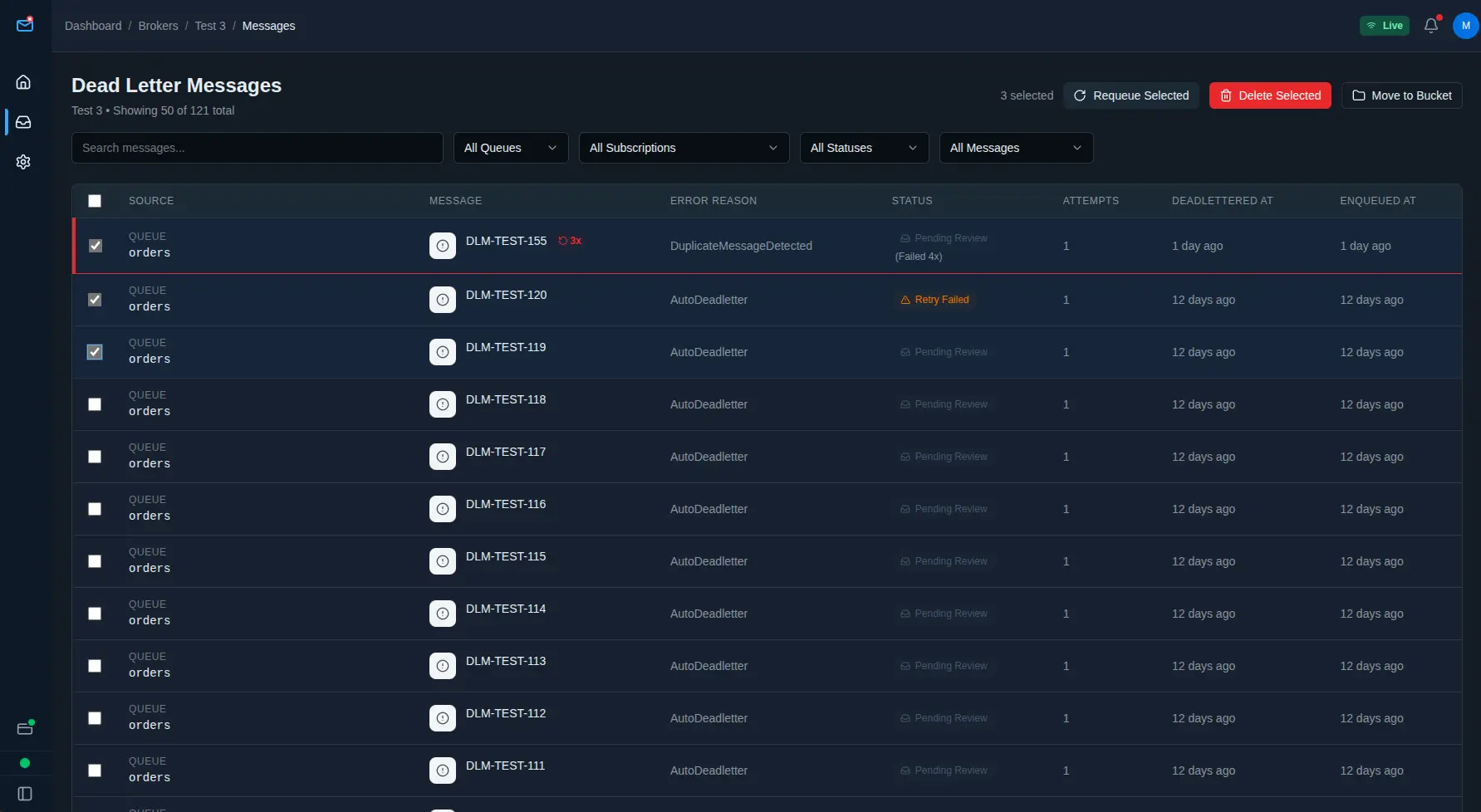
DeadLetterOps message detail view showing error analysis, message metadata, and AI-powered similar message detection

Stop Wasting Time on Dead Letters

Join DevOps teams already using DeadLetterOps to cut incident response time

Available Integrations

Connect DeadLetterOps with your existing tools and workflows

Slack Notifications

Get instant notifications in your Slack workspace when dead letter messages arrive. Configure alerts per namespace, queue, or message pattern with AI-powered analysis.

Learn More

PagerDuty Alerts

Create incidents in PagerDuty when dead letter messages arrive. Leverages your existing escalation policies and on-call schedules - no additional configuration needed.

Manage Dead Letters from Your Terminal

Built with native support for the Model Context Protocol (MCP) - Anthropic's open standard for AI coding assistant integrations. Query, analyse, and fix dead letters without leaving your terminal or IDE.

Works with Claude Code, ChatGPT, and any MCP-compatible coding assistant. Manage incidents without leaving your terminal - setup takes less than 2 minutes.
What you can do:

  • "Show me all failed orders in the last hour" Natural language queries across all namespaces
  • "Find similar payment failures" AI similarity search without leaving your assistant
  • "Requeue all timeout messages to the retry queue" Bulk operations via conversation
  • "What namespaces have the most failures today?" Analytics and insights on demand

Why MCP matters:

  • The only dead letter management platform with MCP support Built for DevOps teams who live in their terminal
  • Faster MTTR Stay in your terminal - no context switching to browsers or separate tools
  • Secure by Design OAuth-based authentication - no API keys to paste into config files or risk exposing
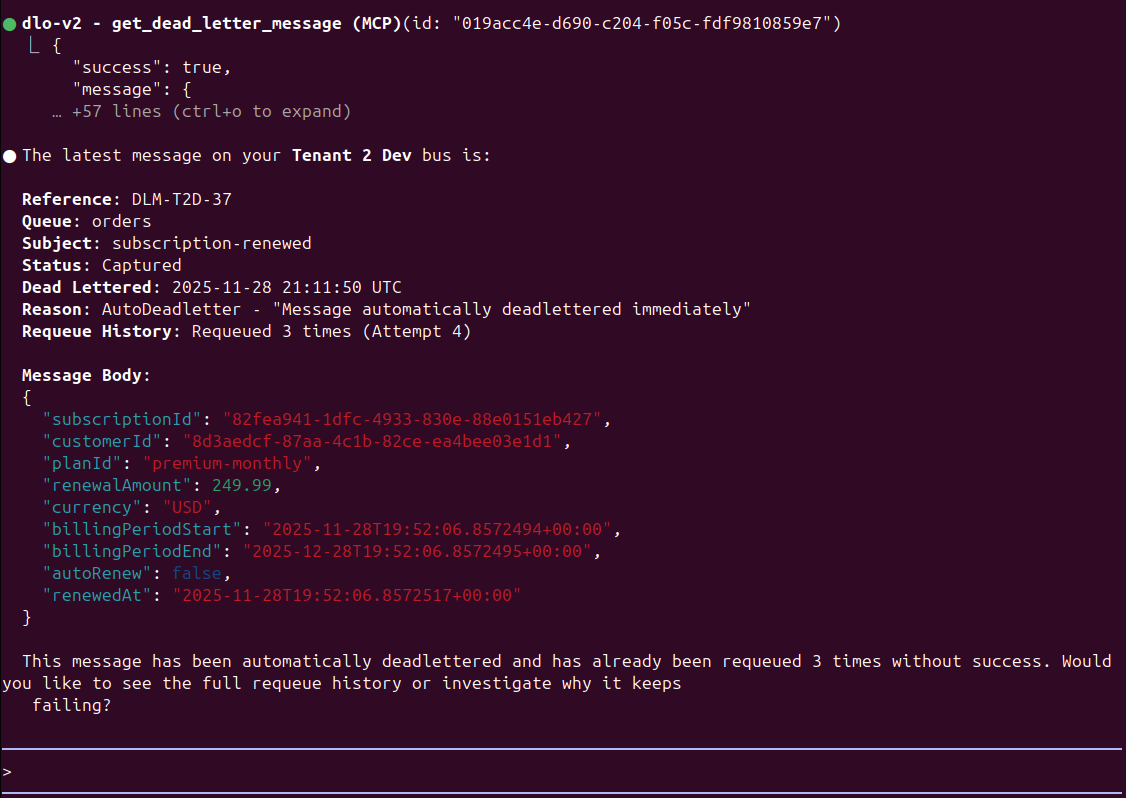
Claude Code terminal interface showing MCP integration with DeadLetterOps, demonstrating natural language query to fetch and analyse dead letter messages

Manage dead letters directly from Claude Code with natural language queries

Everything You Need to Manage Dead Letters

Built specifically for Azure Service Bus with deep integration and powerful automation

Built for Azure Service Bus

Native Azure Service Bus integration with support for queues, topics, and subscriptions. Monitor listener health, track message lineage, and manage dead letters across all your namespaces.

Find Related Failures in Seconds

Our AI analyses message content and metadata to find similar failures across your system. Identify patterns and root causes significantly faster than manual investigation.

Requeue or Delete Up to 100 Messages at Once

Stop processing messages one-by-one. Select up to 100 messages and requeue or delete in bulk. Edit message content before replay or send to alternate queues.

Organize Failures with Issue Buckets

Group related dead letter messages into issue buckets. Track resolution status, assign to team members, and maintain a clear audit trail of incident response.

Get Alerted When It Matters

Connect your Slack workspace and receive instant notifications when new dead letter messages arrive. Configure alerts per namespace, queue, or message pattern.

AI Assistant Integration

Manage failures from Claude Code, ChatGPT, or any MCP-compatible assistant. Query dead letters naturally from your terminal: "Show failed orders in the last hour" or "Requeue all payment timeouts".

You're Already Juggling Too Many Tools

Between the Azure Portal's Service Bus Explorer, the desktop Service Bus Explorer app, and custom PowerShell scripts, managing dead letters is still a mess of manual clicking, context switching, and zero visibility.

DeadLetterOps unifies everything into one platform. No more tool switching, no more custom scripts to maintain, no more lost context when incidents happen.

Every approach has the same problems:

  • Manual clicking through namespaces, queues, and subscriptions
  • Processing messages one-by-one (or writing scripts for bulk operations)
  • No way to find similar failures across queues and namespaces
  • No audit trail - who requeued what, when, and why?
  • No real-time alerts when new dead letter messages arrive

Simple, Transparent Pricing

Start free. Scale as you grow. No hidden fees.

Developer

£ 0 /month

Perfect for individual developers and testing

  • 5,000 messages/month
  • Up to 3 Azure Service Bus namespaces
  • 50 AI similarity searches/month
  • 50 MCP queries/day (AI assistant access)
  • 7-day message history
  • Batch operations (up to 100 messages)
  • Email support
Start Free

Team

£ 99 /month

For small teams managing production workloads

  • 50,000 messages/month
  • Up to 5 namespaces
  • 30-day message retention
  • 500 AI similarity searches/month
  • 500 MCP queries/day
  • AI-powered Slack notifications
  • Issue bucket organisation
  • Batch operations (up to 100 messages)
  • Priority email support
Start 14-Day Trial

Professional

£ 349 /month

For growing teams with multiple services

  • 500,000 messages/month
  • Up to 20 namespaces
  • Custom retention policies (90+ days)
  • Unlimited AI similarity searches
  • Unlimited MCP queries
  • AI-powered Slack notifications
  • Advanced message filtering
  • Issue bucket organisation
  • Batch operations (up to 100 messages)
  • Dedicated support (4-hour response)
Start 14-Day Trial

Ready to Stop Fighting Azure Service Bus Dead Letters?

Join development teams who've cut dead letter incident response time dramatically. Start with our free tier - no credit card required.